
Ubuntu开启root
腾讯云服务器 Ubuntu 系统的默认用户名是 ubuntu,并在安装过程中默认不设置 root 帐户和密码。如有需要,可 在设置中开启允许 root 用户登录。具体操作步骤如下:
1、使用ubuntu账号登录服务器,可用ssh密匙登录
2、登录进去后,先设置root密码
bash
sudo passwd root按回车,输入2次,提示密码设置成功
3、输入如下命令,打开sshd_config配置文件
bash
sudo vi /etc/ssh/sshd_config4、按 i 切换至编辑模式,找到 #Authentication,将 PermitRootLogin 参数修改为 yes。如果 PermitRootLogin 参数被注释,请去掉首行的注释符号(#)。
如下图所示(好像是在配置文件的最下面):
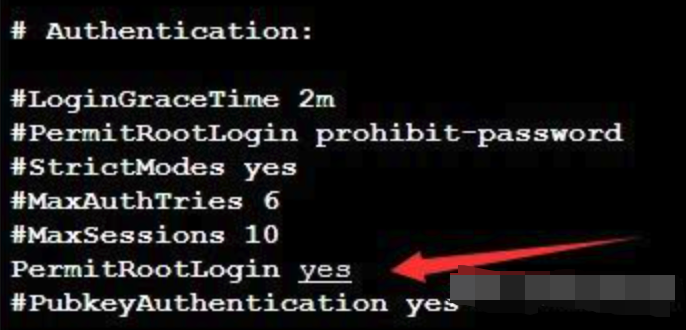
5、先按ESC,再按“:”,输入:wq,保存文件并返回
6、执行以下命令,重启ssh服务
bash
sudo service ssh restart7、在pycharm里面用ssh连接,就可以使用ubuntu账号登录开启root权限了 当输入 conda activate base 遇到报错时
bash
> CommandNotFoundError: Your shell has not been properly configured to use 'conda activate'.
> To initialize your shell, run

$ conda init <SHELL_NAME>

Currently supported shells are:

- bash
- fish
- tcsh
- xonsh
- zsh
- powershell

See 'conda init --help' for more information and options.

IMPORTANT: You may need to close and restart your shell after running 'conda init'.输入以下指令:
bash
source activate
conda deactivate
conda activate base